 A service of CHTS
Electronic Certificate of Conformity
Your eCoCs validated, signed and sent to EUCARIS.
One platform for vehicle manufacturers and bodybuilders. You provide the vehicle data; the platform checks it, builds the eCoC, signs it with your certificate and sends it to the European registration authorities.
- VIN
- WMA0X1ZZ7RB004512
- Type-approval
- e6*2018/858*00412*01
- Category
- N2 · completed vehicle
- Stage
- 2 of 2 (multi-stage)
- Data provided
- Validated, 0 errors
- Signed with your certificate
- Sent via the RDW NAP
- EUCARIS acknowledgement
Sample data
Why this matters now
The paper CoC is giving way to an electronic message.
Anyone placing vehicles on the road increasingly supplies the Certificate of Conformity electronically, in the IVI 2.0 format and through the EUCARIS network. That message has to be error-free and digitally signed.
In practice this means building XML files, meeting hundreds of validation rules, managing a qualified certificate and working through rejections with error codes. For a small-series manufacturer or a bodybuilder, that is a lot of work on top of the actual trade.
e-coc.be takes that work off your hands. You work in a web application; the platform enforces the rules.
How it works
From vehicle data to acknowledgement in five steps.
- 01
Provide
Enter the data on screen or upload a file. Fixed type data only needs to be entered once.
- 02
Validate
The platform checks the record against the IVI 2.0 rules before sending and shows what is missing or wrong.
- 03
Build
The eCoC is assembled from the right template for each vehicle category and regulation.
- 04
Sign
Signed with your own qualified certificate (eIDAS), stored securely in a key vault.
- 05
Send
Submitted through the RDW access point to EUCARIS. You see the acknowledgement and everything stays traceable.
The platform
How you work in e-coc.be.
Swipe to see the full screen · tap to enlarge
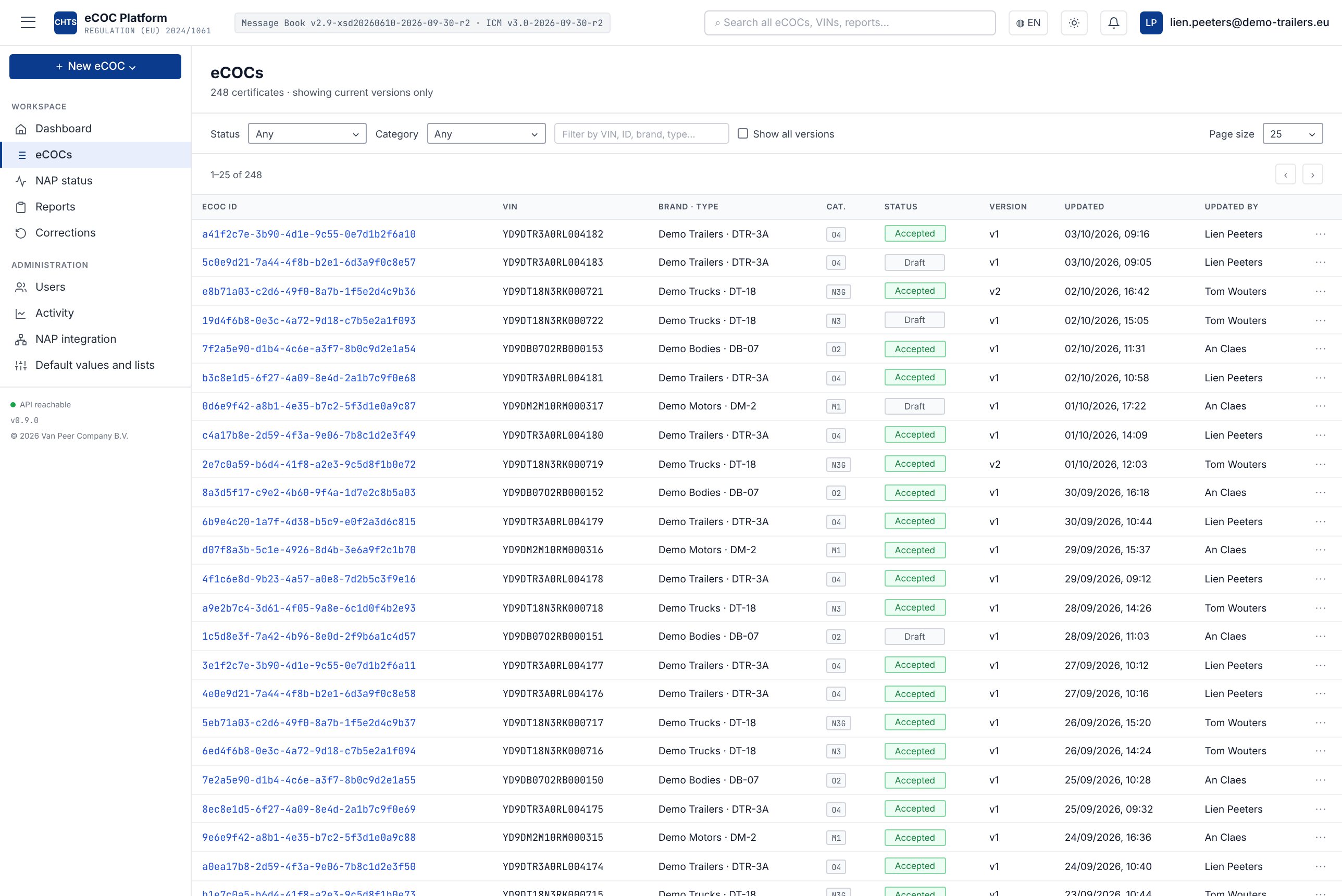
Overview of your eCoCs
All records in one place, with status, version and who changed it last.
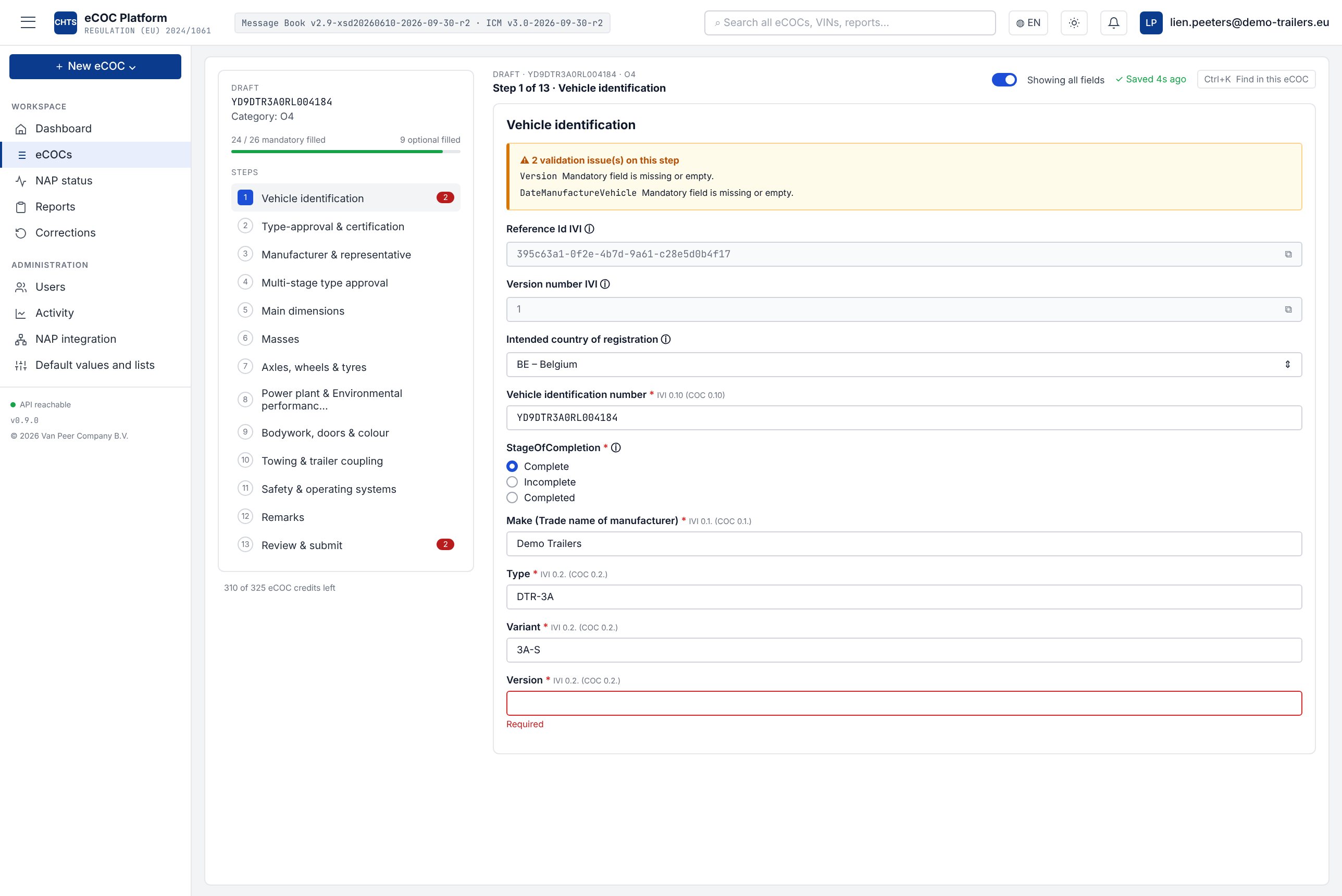
Thirteen guided steps
Each step shows only the fields for your category, with the IVI and CoC reference. Missing fields are flagged straight away.
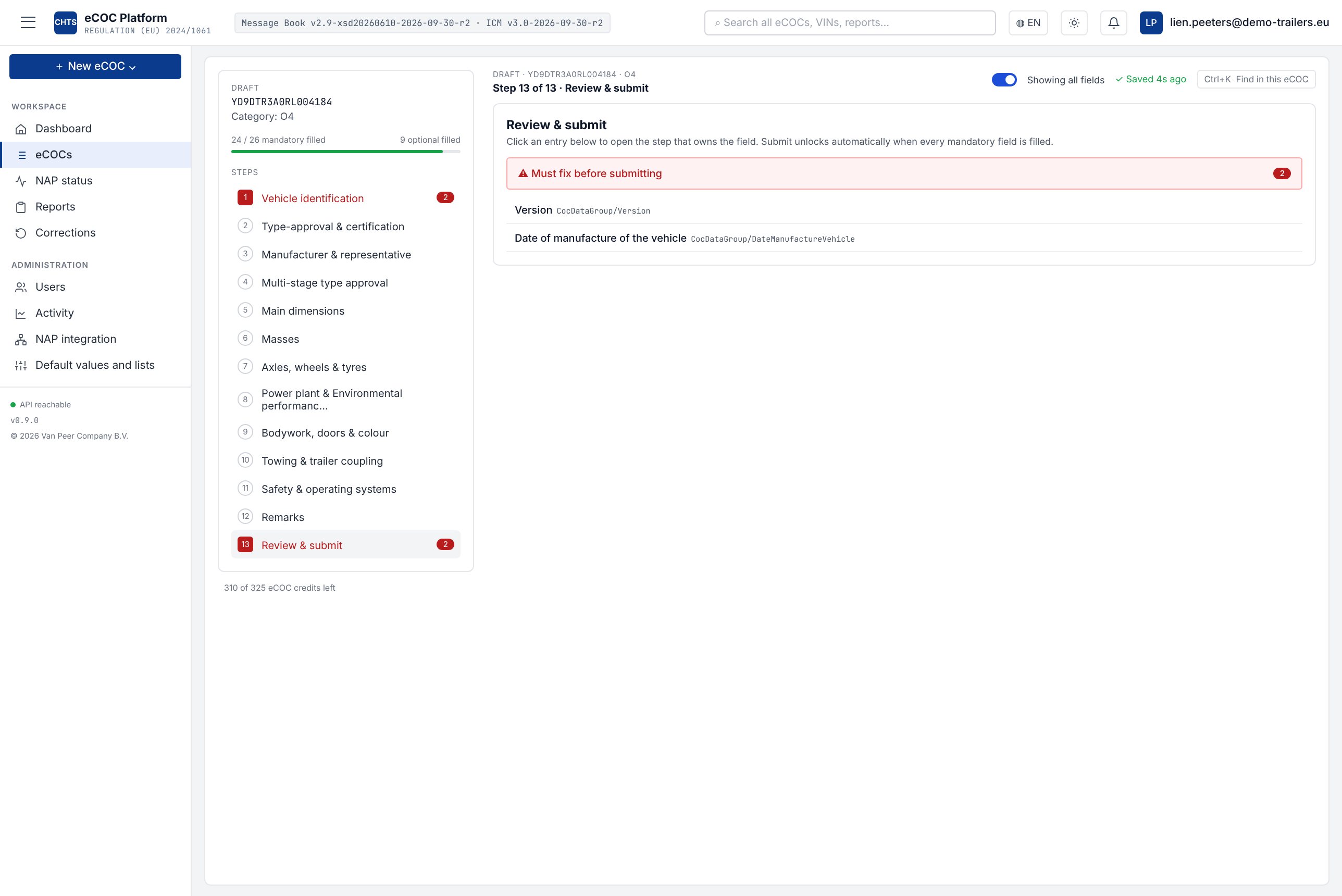
Checks before sending
The last step lists what still needs doing. Submitting unlocks only once every mandatory field is filled.
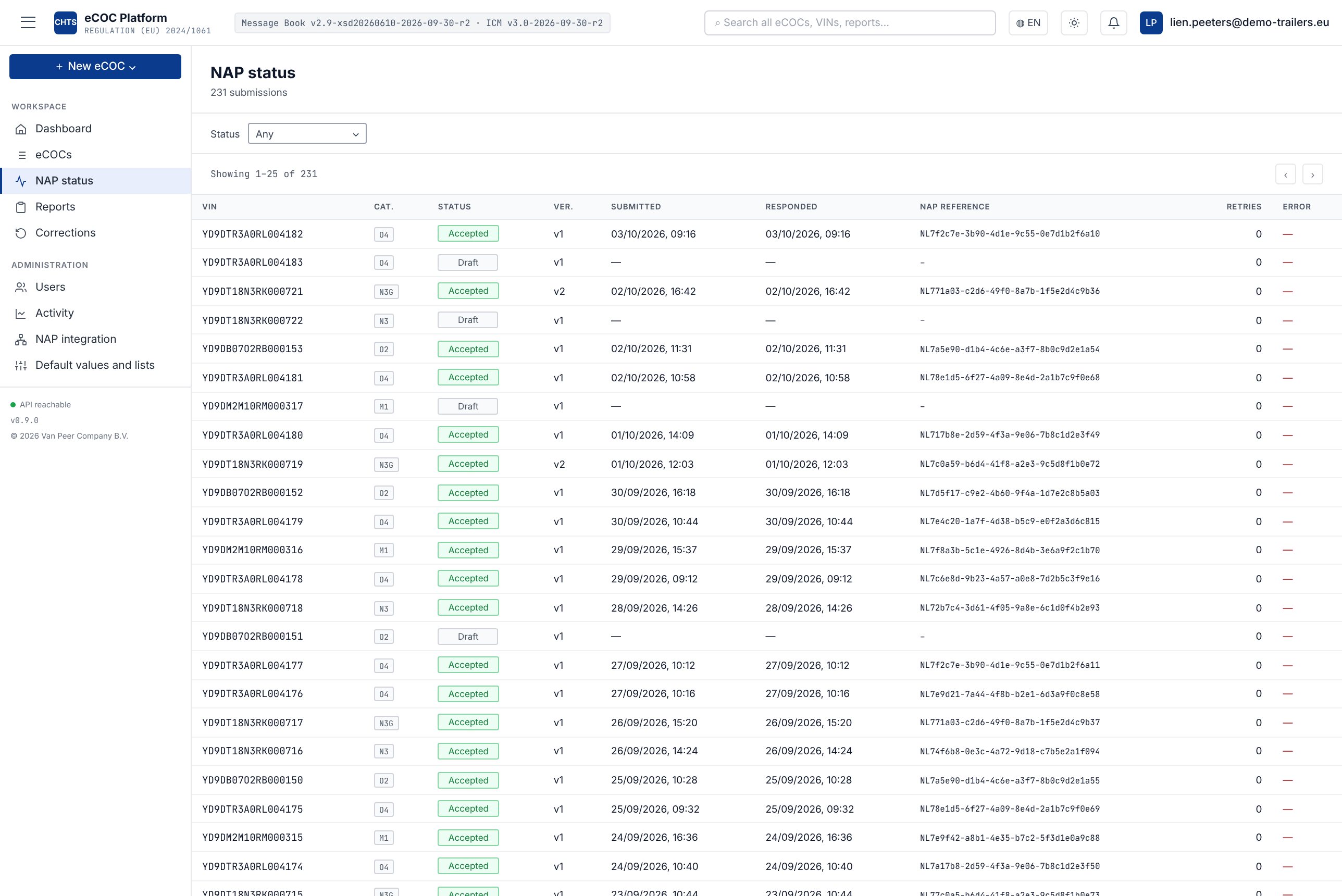
Track every submission
Per vehicle the status, when it was submitted and answered, and the NAP reference.
Screenshots of the platform, with fictitious sample data.
Features
Everything you need, from data entry to archive.
Provide data your way
- Guided entry in thirteen steps, showing only the fields for your category
- Pick lists with the official IVI code values
- Upload XML files by drag and drop, with automatic XSD and ICM checks
- Excel import for those who already keep their data in a spreadsheet
- Duplicate an existing eCoC: VIN cleared, everything else kept
- Default values per vehicle type, so you never type the same data twice
- Auto-save and search for any field within an eCoC
Checks before sending
- Checked against the IVI Messagebook and the ICM validation rules
- Each step shows what is missing or wrong, with a reference to the IVI field
- Submitting unlocks only once every mandatory field is filled
- New rule versions are loaded centrally with an effective date; eCoCs in progress keep their own version
PDF and downloads
- The CoC as a one-page A4 PDF, with the manufacturer's logo and name
- PDF preview before you submit
- Download as PDF from the overview and from the record
- Download the signed XML message for your own records
- Draft XML for review before submitting
Sign and submit
- Digital signature (XMLDSig, SHA-256) with your own qualified certificate
- Your key stays in a secure key vault and is never downloaded
- Submission through the RDW access point to EUCARIS
- For every submission: status, response time and NAP reference
- Corrections as a new version, with the full history
Management and overview
- Invite users and set rights per user
- Activity log: who did what and when
- Dashboard and reports on your submissions
- Overview of your eCoC credit balance
- Warning before your certificate expires
- Strict separation between manufacturers, sign-in with two-factor authentication
Connect your systems
- We connect the platform to your ERP or your own system, so vehicle data never has to be entered twice
- A connection is custom work: we agree which data, which format and how often, and you receive a separate quote up front
- Prefer to start small? Begin with entry or upload and connect later
Signing certificate
Your certificate via Sectigo, arranged with you.
Every eCoC must be signed with a qualified electronic seal (eIDAS) in your company's name. For this we work with Sectigo, a recognised European certificate provider.
- 01
Requested from the platform
We create the key in the platform's secure key vault and prepare the request. The private key never leaves that vault.
- 02
Validated by Sectigo
Sectigo verifies your company details directly with you, based on the company register (KBO/BCE, KvK, …). No token or extra hardware.
- 03
Linked to your account
Sectigo delivers the certificate as a file. We link it to your account, after which you can sign and submit.
- 04
Renewed on time
The certificate is valid for up to three years. The platform warns you well in advance when renewal is due.
Important: your company name must be written identically in the company register, on your type-approval and on the certificate. We check this before the request, so you lose no time.
What you get
Everything that makes an eCoC difficult is already built in.
All categories
Cars, buses, commercial vehicles and trailers. The right fields per category, from 179 to 324, and only those.
Code lists built in
Every IVI code value is available as a pick list. No typos in codes that the RDW rejects later.
Errors before sending
The platform checks your record against the IVI and ICM rules and only allows sending once blocking errors are resolved.
Type data entered once
Record a vehicle type once and duplicate it per VIN. You only fill in what differs.
Keys leaving the vault
Your signing certificate is kept in a secure key vault. The private key is never downloaded or shared.
Expiry warning
You see well in advance when your certificate expires, so submissions never stall.
Corrections with history
Rejected or changed? You create a new version. Who did what and when stays visible in the audit trail.
Secure and separated
Sign-in with two-factor authentication. Your data is strictly isolated from other manufacturers.
The choice
Build your own connection, buy a package, or use e-coc.be?
| Own connection | Generic software package | e-coc.be | |
|---|---|---|---|
| Connection to RDW and EUCARIS | Arrange it yourself: transport certificate, secure connection, acceptance testing with the RDW. | Depends on the vendor. | ✓Already set up and tested. You join a working chain. |
| Connection to your ERP or own system | Build and maintain it yourself. | Depends on the vendor. | ✓Custom connection built by us, based on a separate quote. |
| Keeping up with IVI rules | Every new version or rule change is an IT project of its own. | Updates on the vendor's schedule. | ✓Updated centrally for all users, with no work on your side. |
| Type-approval expertise | Needs to be in-house or hired in. | Usually a software house, not a technical service. | ✓A technical service that knows your files and the regulations. |
| Help with your certificate | Figure it out yourself. | Often limited to the software. | ✓Guidance with application, installation and renewal. |
| Multi-stage and small series | Possible, but you build every scenario yourself. | Often geared to large volumes. | ✓Built for small series and multi-stage vehicles. |
| Upfront investment | Development, testing and maintenance at your own cost. | Licence plus implementation. | ✓No development costs. You pay for use. |
| Time to first eCoC | Months. | Weeks to months. | ✓As soon as your certificate and account are ready. |
Working with an ERP or your own system? We connect the platform to it, so your vehicle data flows straight into the eCoC. A connection is custom work and is quoted separately.
Who it is for
Made for those who must submit an eCoC themselves.
Vehicle manufacturers
Own type-approval, limited volumes, no appetite for an in-house IT project.
Bodybuilders
Completing a base vehicle, with the right stage and a reference to the previous one.
Trailer builders
Trailers and semi-trailers, with fixed type data and fast entry per VIN.
Importers
Who supply certificates in Europe on behalf of a manufacturer.
- Founded
- 2018
- Based in
- Nossegem (Zaventem), Belgium
- Accreditation
- BELAC, EN ISO/IEC 17020 and 17025
Accreditation scope: Inspection (17020) · Testing (17025)
About CHTS
A recognised technical service behind the platform.
CHTS was founded in 2018 and has grown into a recognised technical service in the automotive sector. From Nossegem (Zaventem), a team of experienced specialists works every day on the technical approval of vehicles and vehicle components.
With e-coc.be, CHTS brings that type-approval expertise straight to the electronic CoC: you work with people who know your files and the regulations.
Specialised in
- EU type-approvals
- National approvals, including individual approvals and National Small Series
- Component approvals
For
Type-approval expertise
e-coc.be is a service of CHTS. You work with people who know the regulations and inspection practice.
Guidance with your certificate
Applying for a qualified signing certificate is new to many manufacturers. We guide you step by step.
Nothing to install
A web platform with its own users per company. Your data stays separate from other manufacturers.
Questions
What manufacturers often ask us.
Do I need my own certificate?
Yes. The eCoC is signed with a qualified certificate in your company's name. That certificate is yours, whichever channel you submit through. We work with Sectigo for this and guide you through the application and the link with the platform.
Do I need to install software?
No. You work in your browser. You invite colleagues yourself and decide who can do what.
What happens if an eCoC is rejected?
You receive a notification with the reason. You correct the record in the platform and send a new version. The full history is kept.
Can I submit several vehicles at once?
Yes. You record the fixed type data once, then per vehicle you only fill in what differs.
What does it cost?
That depends on your volumes and number of vehicle types. In a short demo we look at your situation, after which you receive a tailored proposal.
See it working with your own vehicle type?
Request a quote or book an online demo. You will find both on the CHTS eCOC page.